Notifications
Notifications collect replies to your comments, @mentions, and announcements — surfaced both on a full page and by the 🔔 bell in the top bar. Announcements & daily counts are tagged 📣 broadcast.
The notifications page
Your 🔔 in full, with type filters.
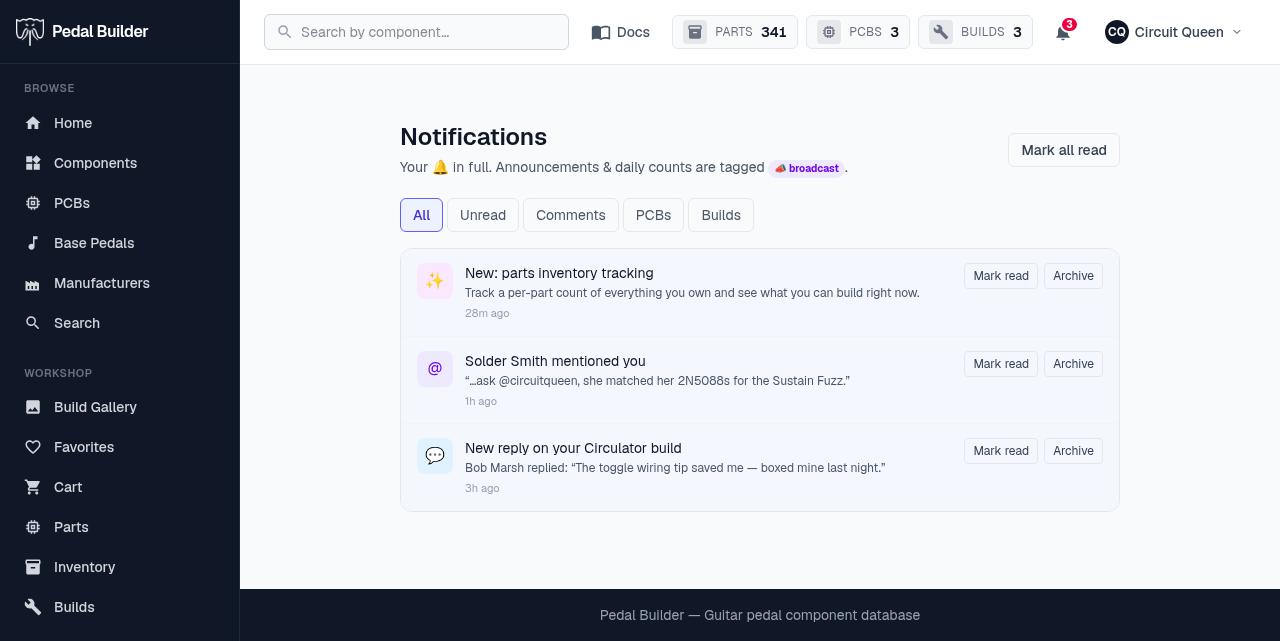
- 1Filters — Narrow the feed: All, Unread, Comments, PCBs, Builds.
- 2Each notification — A category icon, a title that links to whatever triggered it, an optional body, and a relative time.
- 3Mark read / Archive — Clear one from your unread count, or archive it out of the list.
- 4Mark all read — Clears the whole unread badge at once.
The bell dropdown
A quick peek from anywhere in the top bar.
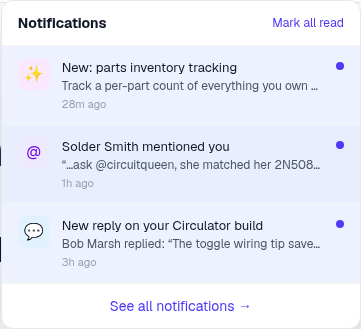
- 1Mark all read — Same one-tap clear, without leaving the page.
- 2Most recent — The latest few notifications; click one to read it and jump to the source.
- 3Unread dot — A blue dot marks the ones you haven’t seen; the bell’s red badge counts them.
- 4See all — Opens the full notifications page.
Good to know
- Requires an account; the bell badge mirrors your unread count. Signed out, the page shows public announcements only.