Parts inventory
Your parts inventory is where Premium builders track the Parts they actually own. It powers the “what can I build right now?” and shopping-list features — and it’s where you audit and correct your counts.
Every part you own, editable in place
The shared parts table, plus an On-hand column and a Remove button.
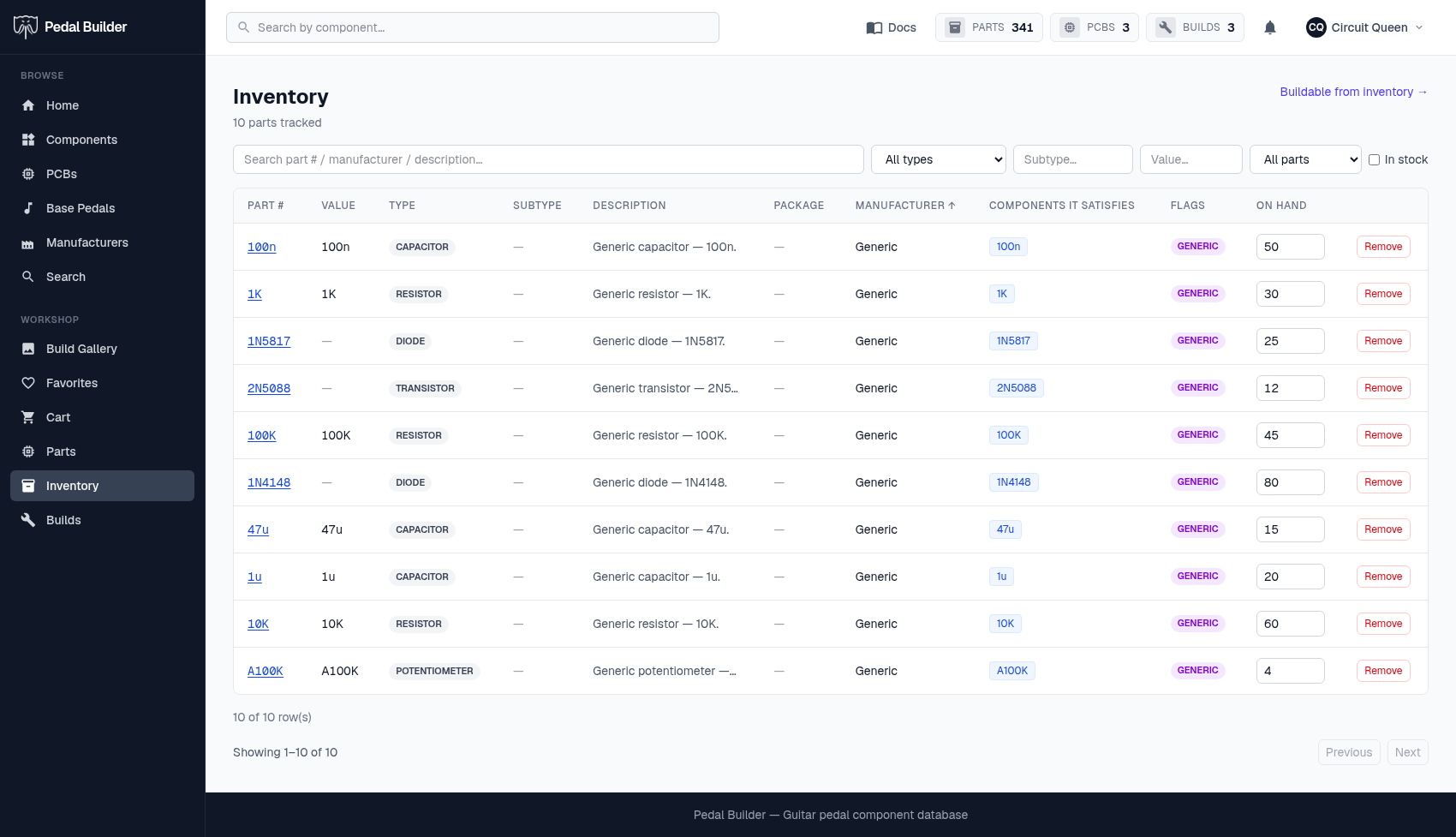
- 1Buildable shortcut — “Buildable from inventory →” jumps to the list of PCBs your current stock can build.
- 2Search & filter — Find a part fast — search, filter by type/subtype/value, generic-vs-branded, and an In-stock toggle to hide zero-count rows.
- 3Components it satisfies — Which generic component(s) each part fills — the link back into the catalogue.
- 4On hand — Edit the count in place to correct it after a drawer count; it saves on blur with a “✓ saved” flash.
- 5Remove — Drop a part you no longer keep from your inventory.
Good to know
- Premium feature.
- An empty inventory prompts you to add your first parts (from the Parts catalog, a part page, or the cart’s “Add all to inventory”).
Tips
- Counting a drawer? Filter to that type, then correct each On-hand number in place — that’s the inventory audit flow.